
 By Ammar Sabilarrohman
In the fast-paced world of digital photography, the quest for the "perfect" look often leads editors down a rabbit hole of presets, plugins, and high-contrast adjustments. Yet, for all our technological advancement, many photographers remain tethered to the baked-in gamma curves dictated by their camera manufacturers. While profiles like "Adobe Color" or "Camera Standard" provide a punchy, ready-to-share image, they often mask the true potential of the underlying RAW data.
A growing movement within the Lightroom community is championing a shift toward "Linear Camera Profiles"—a technique borrowed from the cinema industry that promises to revolutionize how we handle tonal response and color grading. By stripping away the manufacturer’s contrast curve, photographers are finding that they can exert a level of control over their images previously reserved for professional colorists in DaVinci Resolve.
The Core Concept: Decoding Linear Camera Profiles
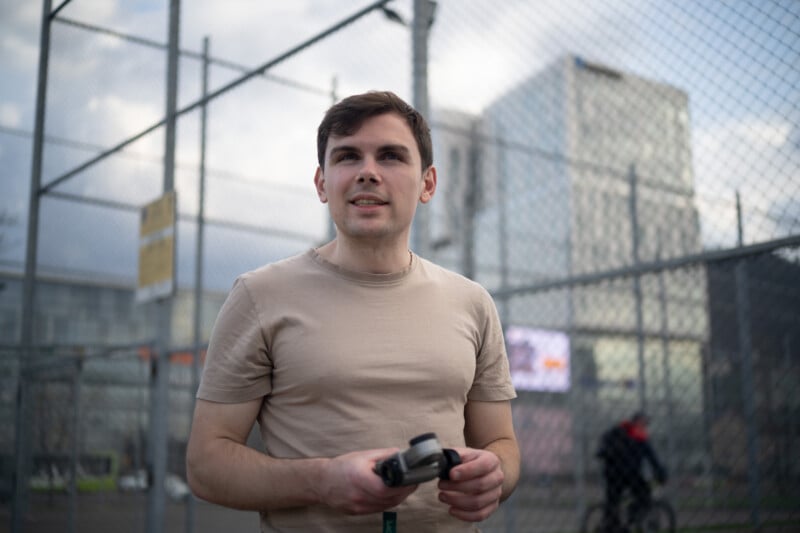
At its most fundamental level, a Linear Camera Profile is an alternative to standard camera profiles that removes the built-in gamma curve, presenting RAW data in a "straight" or linear tonal response. When applied, these profiles often result in a flat, grey, and seemingly under-exposed image. While this might look unappealing to the casual observer, it is exactly what a digital sensor is designed to output.

Cameras inherently capture data in a linear fashion, but they apply a gamma curve to the preview—and often to the file itself—to make the image appear natural to the human eye. By utilizing a linear profile, the photographer gains access to the "rawest" form of the data. This is not about gaining additional dynamic range—that is a physical limitation of the sensor—but rather about gaining total control over how that dynamic range is distributed and shaped.
A Chronology of the Shift: From Cinema to Stills
The integration of linear workflows into photography did not happen overnight. It is the direct result of a cross-pollination between the worlds of high-end cinematography and digital still photography.
The Influence of Logarithmic Workflows
In professional video production, data is frequently captured using S-Log or similar flat gamma curves. Colorists do not edit the "baked-in" look; they grade the flat data and apply an Output Gamma Transform (or a LUT) at the very end of the node chain. This separation of "balancing" and "grading" allows for greater flexibility without introducing destructive artifacts.

Adopting the "Node-Based" Mindset
Over the past several months, photographers have begun to realize that the same philosophy applies to Lightroom. By treating the image as a blank slate, the editor can perform primary adjustments (exposure and white balance) on a flat, linear image, and then apply a custom, non-destructive "gamma curve" as the final step. This prevents the "crunchiness" and artifacting that occur when one pushes contrast on an already contrasty image.
Supporting Data: Why "Standard" Profiles Fail the Pro
To understand the necessity of this transition, one must look at how modern camera profiles manipulate data. Traditional profiles—such as Sony Standard or Adobe Standard—feature aggressive gamma curves characterized by rolled-off highlights, lifted shadows, and a mid-tone bump.
The Problem with Baked-in Contrast
While these curves are efficient for social media or rapid turnaround, they pose a significant obstacle for fine-art editing. When a photographer attempts to recover highlights on a curve that has already compressed them, they risk creating digital artifacts. Furthermore, because these profiles have baked-in contrast, any further adjustment to the tone curve often results in muddy colors and unnatural saturation shifts.
The Histogram Advantage
Working with a linear profile also provides a more accurate representation of the data. Because standard profiles are influenced by the manufacturer’s gamma curve, the on-camera histogram is often misleading, leading to over-exposure or missed shadow detail. A linear profile ensures that the histogram displayed is an accurate reflection of the sensor’s captured data, allowing for precise exposure staging in the field.
The Professional Workflow: A Step-by-Step Methodology
Transitioning to a linear workflow requires a disciplined approach to the Lightroom interface. Since Lightroom does not allow for a true "node-based" architecture, the editor must simulate it through the strategic use of global adjustments and masking.
1. Preparation and Initialization
The process begins by shooting in a neutral profile to ensure an accurate histogram. Once in Lightroom, the first step is to apply the Linear Camera Profile. Before any aesthetic grading occurs, the photographer must establish a baseline:
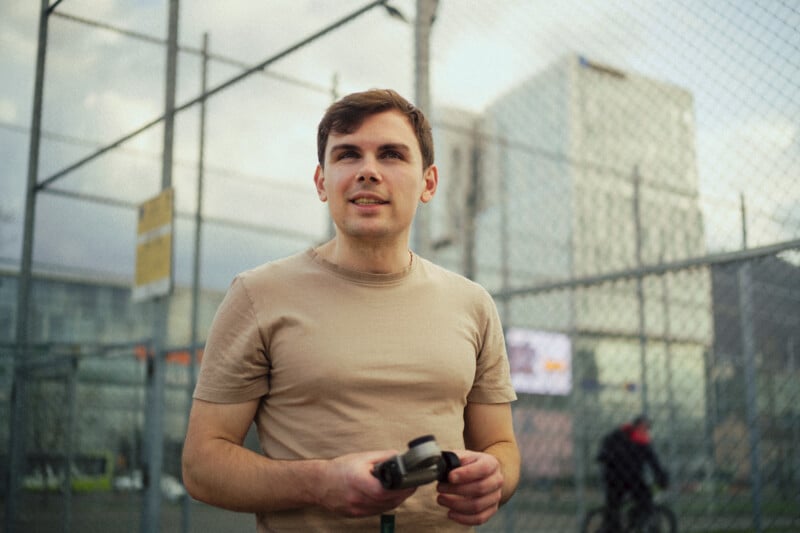
- White Balance Calibration: Address color casts early, as the linear profile reveals these with stark clarity.
- Global Exposure Balancing: Use the Exposure, Blacks, and Whites sliders to ensure the data is centered. The goal is to maximize the data without clipping the histogram edges.
2. The "Custom Gamma" Technique
The most crucial step involves the use of a "Select All" mask—a Luminance Range mask that covers the entire frame. Within this mask, the photographer applies a custom Tone Curve. This acts as the "Output Gamma Transform," effectively replacing the manufacturer’s curve with one designed for the specific artistic vision of the shot.
Whether the goal is a soft, filmic shoulder for a cinematic look or a clean, modern S-curve, this step allows the editor to define the image’s "personality" without affecting the initial color balance.
3. Grading the Mid-Tones
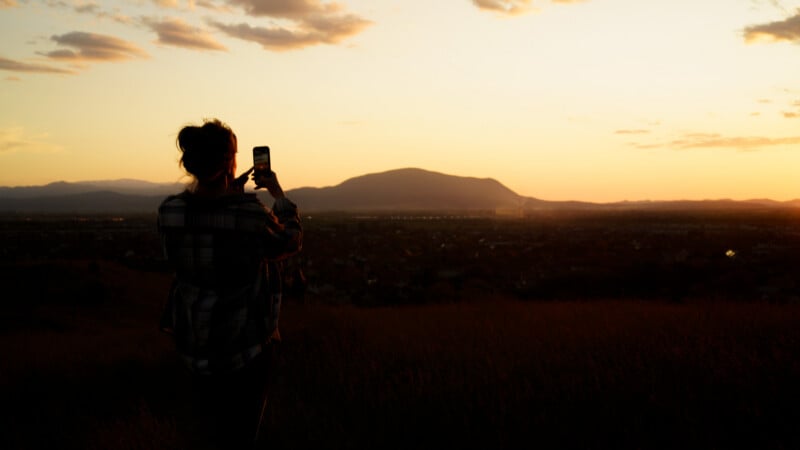
With the gamma established, the photographer is free to utilize color wheels, HSL panels, and Color Response Curves. Because these adjustments are sitting "underneath" the global gamma curve in the processing pipeline, the colors remain vibrant and natural, avoiding the heavy-handed contamination often seen in traditional edits.
Implications: The Trade-off Between Effort and Perfection
While the benefits of this workflow are undeniable, it is not a "silver bullet" for every situation. There are distinct implications for those choosing to adopt this method.
The Time Investment
The primary drawback is efficiency. Creating a custom Linear Camera Profile requires technical effort for every camera model in one’s kit. Furthermore, because Lightroom does not allow for reordering masks via drag-and-drop, the workflow can be cumbersome. It requires a high level of organization; if an editor decides to change their gamma curve midway through, they may need to rebuild their masking stack to ensure the correct order of operations.
Achieving Professional Consistency
Despite the complexity, the implications for professional quality are profound. Photographers who use this method report:
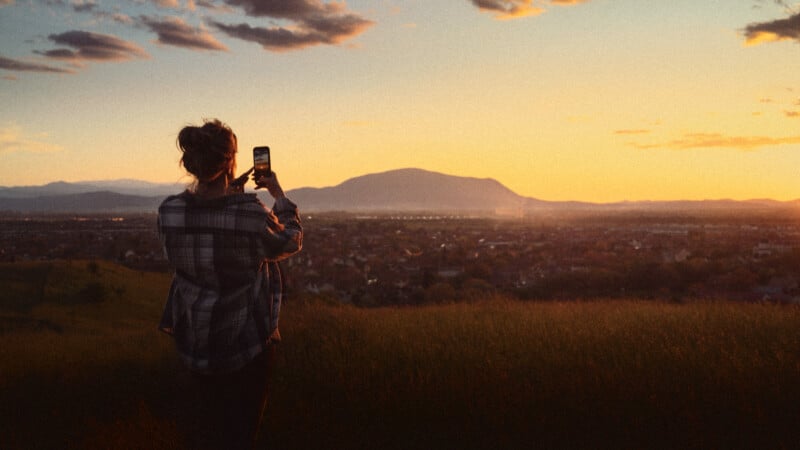
- Superior Color Separation: By isolating the gamma curve, color shifts occur in a more controlled, balanced environment.
- Natural Tonal Transitions: Gradients—especially in skin tones and sky areas—remain smoother because the contrast is applied logically rather than through aggressive slider movement.
- Future-Proofing: By maintaining a library of pre-made gamma masks, photographers can eventually automate the "heavy lifting," significantly reducing the time required for this high-level edit.
Conclusion: Is It Time to Switch?
Linear Camera Profiles represent a paradigm shift in how we conceive of "editing" in Lightroom. By moving away from the pre-packaged look of manufacturer profiles, photographers are reclaiming the data they have worked so hard to capture.
While this approach is undeniably more time-consuming and technically demanding than the standard "preset-first" approach, the result is an image that feels more intentional, more cinematic, and fundamentally higher in quality. For the professional photographer—or the enthusiast looking to push their work to the next level—the Linear Camera Profile is not just a tool; it is a gateway to a more authentic and flexible creative process. As we move toward a future where "digital" no longer means "sterile," mastering the linear workflow is the next logical step in the evolution of the craft.
 Reynand Wu
  Basiran
  Muslim