
 By Iffa Jayyana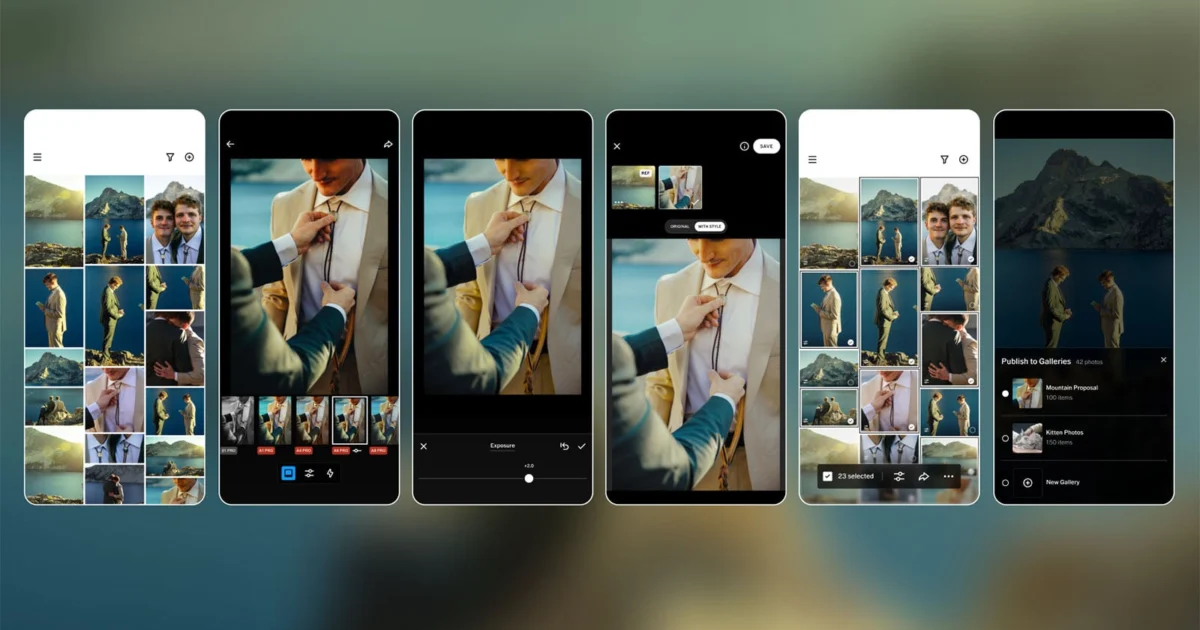
In a significant pivot for the creative software landscape, VSCO has officially launched Studio Pro, a sophisticated, high-performance editing environment designed specifically for the professional photography market. While VSCO has long been synonymous with high-quality film-emulation filters and consumer-grade mobile editing, the debut of Studio Pro signals an aggressive move to capture the professional sector, promising to bridge the gap between desktop-class performance and the agility of mobile hardware.
Currently available on iOS, with a macOS iteration slated for release later this year, Studio Pro arrives at a time when professional photographers are increasingly seeking to reclaim their time from the desk-bound tether of traditional post-production workflows.
Main Facts: The Core of Studio Pro
At its heart, Studio Pro is an answer to the "time-sink" dilemma of professional photography. Designed for high-volume shooters—wedding photographers, event specialists, sports journalists, and portrait artists—the app aims to reduce the hours spent manually syncing edits across large batches of images.
Key Capabilities at Launch:
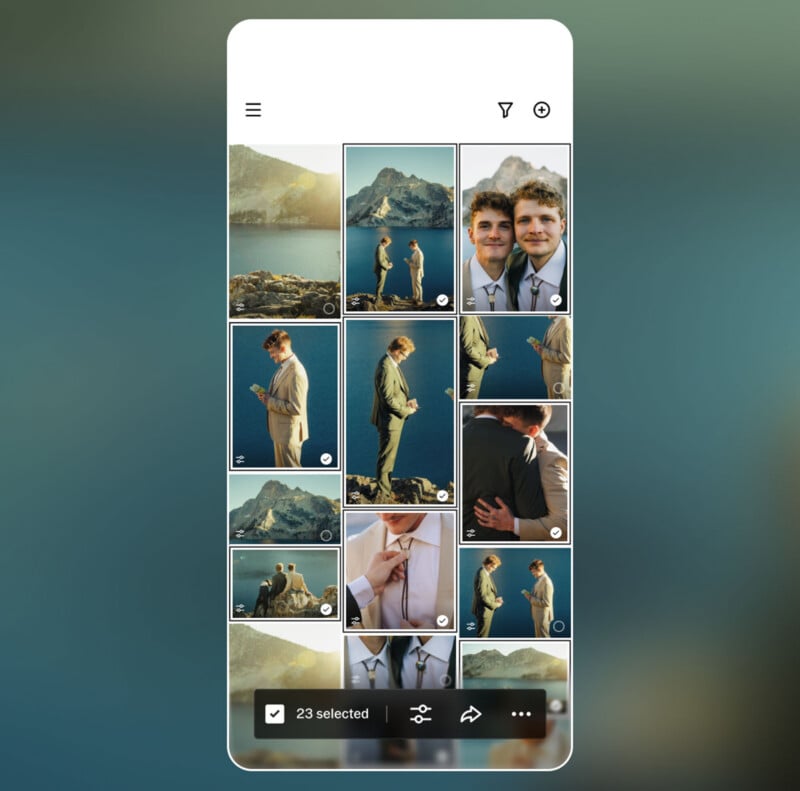
- Mass Batch Processing: Photographers can now apply edits to up to 100 photos simultaneously with a single tap.
- AI-Powered Style Match: Perhaps the most compelling feature, "Style Match" utilizes artificial intelligence to analyze the color, tone, and overall "mood" of a reference image and replicate those properties across a set of selects.
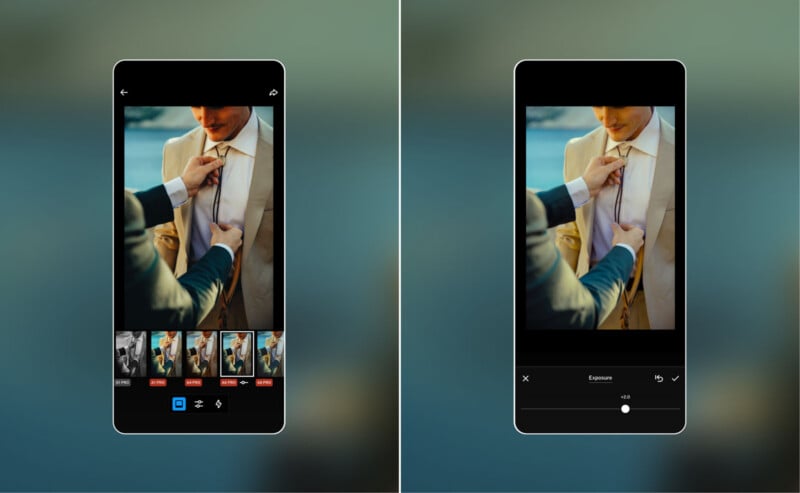
- Comprehensive Manual Toolset: Beyond its famous presets, the app offers deep manual control, including granular adjustments for exposure, contrast, white balance, tone curves, sharpening, and film grain.
- VSCO Galleries Integration: The platform integrates seamlessly with VSCO’s delivery system, allowing photographers to publish edited galleries directly to clients without exiting the application.
While the app is currently free to download on the App Store, the true power of the platform—including the full library of over 200 VSCO presets and advanced toolsets—is locked behind a premium subscription tier, positioning it as a direct competitor to Adobe Lightroom Mobile and similar cloud-based editing suites.
Chronology: The Evolution toward Professionalism
To understand the weight of this launch, one must look at the trajectory of VSCO over the last decade.
- 2011–2015 (The Filter Era): VSCO gained its initial fame as a mobile-first app that prioritized aesthetic quality over the "heavy-handed" filters of early Instagram. It became a cultural touchstone for mobile photography.
- 2016–2022 (Expansion and Community): During this phase, the company expanded its ecosystem, introducing video editing and social features. However, the professional community often viewed it as a "hobbyist" tool due to the lack of batch-processing capabilities.
- Early 2026 (Infrastructure Building): In February 2026, the company laid the groundwork for its professional transition by launching VSCO Galleries, a dedicated service for delivering professional-grade photo albums to clients.
- June 2026 (The Studio Pro Launch): The release of Studio Pro serves as the bridge between the capture-and-edit process and the final delivery-to-client process, creating a vertical integration that is uniquely mobile-centric.
Supporting Data: Why Efficiency Matters
The professional photography industry is currently undergoing a "velocity crisis." As expectations for faster turnaround times grow—clients now often expect sneak peeks within hours of an event—photographers are spending disproportionate amounts of time at their computers.
According to market research within the creative industry, the average professional photographer spends roughly 30% to 50% of their total work week on post-production. The "manual grind" of importing, culling, and editing individual files is the primary culprit. VSCO’s internal data suggests that the batch-editing and AI-matching capabilities in Studio Pro can reduce the post-production timeline for a typical 500-photo event by as much as 60%.
The app is built on a high-performance engine capable of handling batch-processing of 100+ high-resolution images simultaneously without the stuttering or memory management issues that often plague mobile photo editors.
Official Responses and Strategic Philosophy
VSCO has been vocal about the intent behind the new software, framing it as a solution to a market failure.
"Professional photographers often spend hours managing repetitive edits across hundreds or thousands of images after a shoot," a VSCO spokesperson stated during the launch event. "Traditional editing workflows require photographers to manually adjust images one by one, creating significant time spent behind a screen instead of behind a camera. Studio Pro was built to address this challenge."
The company’s philosophy is rooted in the belief that mobile devices are no longer just "content creation" tools, but "production" tools. "Studio Pro combines professional quality, full manual controls, and batch editing in a workflow fast enough to keep up with your ambition," the company added.
Implications: The Shifting Landscape of Professional Post-Production
The arrival of Studio Pro carries significant implications for the photography industry, particularly for those who have been looking to ditch the heavy laptop/hard drive tether.
1. The Death of the "Desk-Bound" Workflow
If an iPad or iPhone can effectively handle a high-volume wedding edit, the need for a high-powered desktop workstation for basic color grading diminishes. This could lead to a cultural shift where photographers finalize their work on-site, in the car, or at a cafe immediately following a shoot, rather than waiting until they return to their home office.
2. Filling the "Pro-sumer" Void
For years, the market has been divided: high-end desktop software (Lightroom/Capture One) or low-end mobile apps. By targeting the "professional who wants speed," VSCO is effectively creating a new middle ground. It isn’t trying to replace the surgical precision of Photoshop, but rather to dominate the high-speed delivery market.
3. The Challenges Ahead
Despite the optimism, the road map for Studio Pro reveals several glaring omissions that currently prevent it from being a total "Desktop Killer." As of this writing, the app lacks:
- Direct Memory Card Import: The absence of a streamlined import workflow from SD cards or external SSDs remains a friction point.
- RAW Support: While the app can handle high-quality JPEGs, the lack of full RAW file support is a significant barrier for high-end professional work.
- Advanced Organization Tools: Features like complex star ratings, flagging, and metadata management (IPTC/XMP) are currently under-developed.
VSCO has acknowledged these shortcomings, confirming that future updates will introduce RAW support, improved file organization, and enhanced export options.
Conclusion: A New Chapter for VSCO
VSCO Studio Pro is an ambitious, if incomplete, leap forward. By focusing on the speed of the professional workflow rather than just the aesthetics of the edit, the company is positioning itself as an essential utility rather than just a social media filter app.
For the photographer who is tired of the long hours spent tethered to a desk, Studio Pro offers a compelling alternative. It promises a future where the mobile device is not just a secondary screen, but the primary engine of the professional creative process. As the macOS version approaches and the feature set expands to include raw file support and advanced metadata management, the industry will be watching closely to see if VSCO can truly fulfill its promise of replacing the traditional desktop-heavy workflow.
For now, the invitation is clear: pick up your phone, sync your batch, and let the AI do the heavy lifting while you focus on the art itself.
 Laily UPN
  Reynand Wu
  Lina Hope